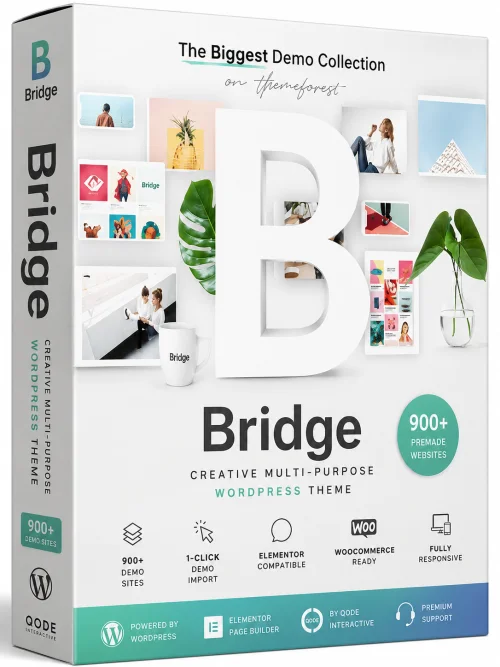
Bridge - Creative Multi-purpose WordPress Theme
WordPress Website Builder
Overview
Introduction and Overview
Bridge is a powerful and versatile multi-purpose WordPress theme designed for creative professionals, agencies, and businesses of all sizes. With its sleek design and robust functionality, Bridge empowers you to build stunning websites without writing a single line of code. Whether you are creating a portfolio, corporate site, online store, or blog, Bridge provides an intuitive drag-and-drop builder and a wealth of pre-designed templates that can be easily customized to match your brand.
Developed by Qode Interactive, Bridge has earned a reputation for flexibility and performance. It combines a clean, modern aesthetic with advanced technical features, making it a top choice for both beginners and experienced developers. The theme is fully responsive, translation-ready, and optimized for speed and SEO, ensuring your website looks great on all devices and ranks well in search engine results.
Key Features
Bridge is packed with features that simplify website creation and enhance user experience. Here are some of the standout capabilities:
- 140+ Pre-Built Demos: Choose from an extensive library of professionally designed demos, each covering various industries like business, creative, portfolio, photography, shop, and more. Import a demo with one click and customize it to fit your needs.
- Drag-and-Drop Page Builder: Use the integrated Qode Slider and Visual Composer to create unique layouts easily. Element editing is highly intuitive, allowing you to add text, images, icons, sliders, and other modules with simple drag and drop.
- Ultimate Flexible Design: Customize every aspect of your website with over 250 options in the theme settings. Adjust colors, fonts, spacing, and more to align with your brand identity.
- WooCommerce Compatible: Fully integrated with WooCommerce, Bridge enables you to build a powerful online store. It includes multiple product layouts, cart options, and a smooth checkout process.
- High Performance & SEO Optimized: The theme follows best coding practices, ensuring fast loading times and clean code. It is optimized for Google and other search engines, giving your content the best chance to rank.
- Responsive and Retina Ready: All demos and elements are fully responsive and retina-ready, delivering crisp images and flawless layouts on any screen size.
- Extensive Typography and Color Options: Choose from thousands of Google Fonts and have full control over typography styles. Set global or page-specific color schemes easily.
- Regular Updates and Strong Support: The theme receives frequent updates and comes with detailed documentation and dedicated support team to help you whenever needed.
- Translation and RTL Support: Bridge is fully translation-ready, compatible with WPML, and includes RTL support, making it ideal for multilingual websites.
- Extensive Portfolio and Blog Layouts: Showcase your work with multiple portfolio grids, sliders, and blog post layouts to keep your content engaging and dynamic.
System Requirements
Before installing Bridge, ensure your server meets the following requirements to guarantee optimal performance and compatibility.
Minimum Requirements
- WordPress 5.0 or higher
- PHP version 7.0 or higher
- MySQL version 5.6 or higher
- Web server: Apache or Nginx
- Memory limit: 128 MB
- Max execution time: 120 seconds
Recommended Requirements
- WordPress 6.0 or higher
- PHP version 7.4 or higher (8.0 recommended)
- MySQL version 8.0 or higher
- Web server: Apache 2.4 or Nginx 1.18+
- Memory limit: 256 MB (or more)
- Max execution time: 300 seconds
- HTTPS support with valid SSL certificate
How to Install and Use
Installing Bridge is a straightforward process. Follow these step-by-step instructions to get your website up and running quickly.
Installation Steps
- Download the theme: Go to your Qode account or ThemeForest, download the Bridge theme package and unzip it. The package typically contains the theme file (bridge.zip) and the demo import files.
- Install WordPress: If you haven't installed WordPress yet, do so via your hosting provider's one-click installer or manually. Ensure your server meets the system requirements.
- Upload the theme: In your WordPress admin dashboard, navigate to Appearance > Themes > Add New > Upload Theme. Choose the bridge.zip file and click Install Now. Once installed, click Activate.
- Install required plugins: After activation, you will see a notice prompting you to install the recommended plugins (like Qode Framework, Visual Composer, Contact Form 7, etc.). Follow the prompts to install and activate them.
- Import a demo (optional but recommended): Go to Bridge > Import Demo, select a demo you like, and click Import. Wait for the process to complete. This will set up the entire site layout, content, and settings.
- Customize your site: Use the Theme Options panel (Bridge > Options) to adjust colors, typography, and other global settings. Use the front-end page builder to edit individual pages and elements.
- Add your own content: Replace default images and text with your own using the built-in editor and media library. Create new pages, posts, portfolios, and products as needed.
- Set menus and widgets: Go to Appearance > Menus to create your navigation menus. Assign them to the appropriate locations. Also, configure sidebars and widgets from Appearance > Widgets.
- Test and launch: Preview your site on different devices, check speed and responsiveness, and ensure all forms and features work properly. Once satisfied, configure your site title and go live!
Pros and Cons
Like any theme, Bridge has its strengths and potential drawbacks. Here’s an honest look at the pros and cons.
Pros
- Extremely versatile: With 140+ demos and countless customization options, you can create almost any type of website.
- User-friendly: The drag-and-drop builder and one-click demo import make it easy for non-coders to build beautiful pages.
- High-quality design: The theme is visually stunning, with modern and creative layouts that stand out.
- Strong support and documentation: Qode Interactive offers thorough documentation, tutorial videos, and a fast support team.
- eCommerce ready: Full WooCommerce integration makes it a solid choice for online stores.
Cons
- Learning curve: Despite its ease, the sheer number of options can be overwhelming for absolute beginners.
- Heavy and resource-intensive: The theme and page builder may require more server resources, potentially impacting loading speed if not optimized.
- Reliance on plugins: Many features depend on third-party plugins, which could lead to compatibility issues if not updated regularly.
- One-time fee: Unlike free themes, you must purchase Bridge. However, the cost is reasonable given its robust features.
Conclusion
Bridge - Creative Multi-purpose WordPress Theme is an outstanding choice for anyone seeking a flexible, visually appealing, and feature-rich theme. It caters to a wide range of website types, from portfolios to online shops, and provides the tools to customize almost every aspect of your site. While it may require a small learning curve and a bit of server optimization, the results are well worth the effort. With regular updates, reliable support, and an impressive demo library, Bridge empowers you to build a professional, high-performing website that stands out in today’s competitive digital landscape. Whether you are a freelancer, a business owner, or an agency, Bridge offers the creative freedom and technical stability you need to succeed.