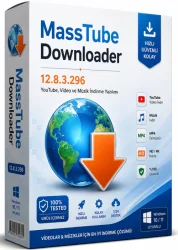
MassTube Plus Mass Video Downloader
Bulk Video Downloader
Overview
Introduction to MassTube Plus Mass Video Downloader
In the digital age, the ability to download videos for offline viewing has become an essential feature for internet users. Whether you need to save a tutorial for later, enjoy your favorite music videos without an internet connection, or collect content for creative projects, a reliable video downloader is indispensable. MassTube Plus Mass Video Downloader is a standout application that simplifies the process with its powerful batch downloading capabilities, support for a wide range of formats, and an intuitive interface. Designed for Windows, this tool has quickly become a go-to for millions of users worldwide. This article will walk you through everything you need to know about MassTube Plus, from its standout features to step-by-step installation instructions.
Unlike standard video downloaders that handle one video at a time, MassTube Plus allows you to queue multiple videos for simultaneous download, dramatically reducing the time spent. It supports an array of websites, including YouTube, Dailymotion, Vimeo, and many others, making it a versatile choice for all your downloading needs. Furthermore, the software goes beyond simple downloading by offering built-in conversion features, enabling users to transform downloaded videos into various formats such as MP4, AVI, WMV, and even extract audio tracks as MP3 files. With its undeniably robust feature set, MassTube Plus earns its title as a "mass" video downloader.
Key Features of MassTube Plus
- Batch Downloading: Save dozens of videos at once by pasting multiple URLs or using the built-in search. This feature is perfect for users who need to download entire playlists or channels.
- High-Resolution Support: Download videos in resolutions up to 4K and even 8K where available, ensuring you get the best visual quality.
- Multiple Output Formats: Choose from MP4, AVI, WMV, MOV, MP3, and more, giving you full control over how you store and use your media.
- Integrated Browser: Browse your favorite video-sharing sites within the app itself, making it easier to find and download content without copying and pasting links manually.
- Video Conversion: Convert downloaded videos to different formats or extract audio in just a few clicks, eliminating the need for separate converter software.
- User-Friendly Interface: Clean and well-organized layout that even beginners can navigate with ease.
- Fast Download Speeds: Optimized download engines ensure you get high-speed downloads without throttling.
- Auto-Update: Regular updates keep the software compatible with the ever-changing algorithms of video platforms.
- Privacy Protection: The app does not track your downloads, ensuring your activity remains private.
Overall, MassTube Plus distinguishes itself by combining functionality with performance. The ability to download entire playlists in one go is a massive time-saver, and the integrated search engine simplifies the discovery of new content.
System Requirements
Minimum Requirements:
- Operating System: Windows 7 or later
- Processor: 1 GHz or faster
- RAM: 1 GB
- Hard Disk Space: 50 MB of free space
- Internet Connection: Required for downloading
Recommended Requirements:
- Operating System: Windows 10 or 11
- Processor: 2 GHz multi-core processor
- RAM: 4 GB or more
- Hard Disk Space: SSD with at least 200 MB free
- Internet Connection: High-speed broadband
While the software can run on modest hardware, meeting the recommended requirements will ensure smooth playback, faster conversions, and a more responsive experience when handling multiple downloads simultaneously.
How to Install and Use MassTube Plus
The installation process is designed to be painless. However, it is important to pay attention during setup to avoid installing unwanted extras. Always choose the "Custom" install if you want to control everything. Once installed, using the software is a breeze. The user interface is intuitively organized, with clearly labeled buttons and menus. Follow these step-by-step instructions to get started:
- Step 1 – Download the Installer: Visit the official MassTube website and download the latest version of the software. Ensure you download from a trusted source to avoid bundled malware.
- Step 2 – Run the Installer: Double-click the downloaded setup file and follow the on-screen prompts. You may be asked to select an installation directory and choose optional components. It is advisable to uncheck any additional offers to keep the installation clean.
- Step 3 – Launch the Application: After installation, open MassTube Plus from the desktop shortcut or Start menu. The interface will load with a welcome screen.
- Step 4 – Copy a Video URL: Navigate to your favorite video site, find the video you wish to download, and copy its URL from the browser's address bar.
- Step 5 – Paste the URL into MassTube: In MassTube Plus, you will find an address bar at the top. Paste the copied link and click the "Analyze" button. The software will parse the link and list available formats and qualities.
- Step 6 – Choose Format and Quality: From the drop-down menus, select your preferred format (e.g., MP4) and resolution (e.g., 1080p). If you only want the audio, choose MP3 as the format.
- Step 7 – Start Downloading: Click the "Download" button to begin. You can monitor the progress in the download manager panel. For multiple videos, paste several URLs at once and click "Download All" for batch processing.
- Step 8 – Save and Enjoy: Once complete, the downloaded file will be saved to your default video folder or the location you specified. You can now watch or manipulate your video anytime.
If you encounter any issues, the application includes a comprehensive help file and an online FAQ to assist with common questions. Additionally, the built-in browser allows you to navigate video sites without leaving MassTube Plus, making the entire process even more seamless.
Pros and Cons of MassTube Plus
Pros
- Free to Use: The software is completely free, with no hidden charges for basic downloading features.
- Time-Saving: Batch downloading and built-in conversion make it a powerful productivity tool.
- High Compatibility: Supports a wide range of websites and video formats, making it a versatile choice.
- Ease of Use: Even non-tech-savvy users can operate the software without a steep learning curve.
- Regular Updates: Active development ensures compatibility with new streaming platforms and encryption methods.
- Portable Version: A portable edition is available for those who prefer to run software without installation.
Cons
- Windows Only: There is no version for macOS or Linux, limiting its audience.
- Occasional Site Issues: Some video platforms may change their structure, temporarily breaking downloads until an update is released.
- Advertisements: The free version may display ads or recommend third-party software during installation.
- No Cloud Integration: Unlike some modern downloaders, it does not offer direct saving to cloud storage services.
- Resource Usage: During batch downloads, the software can consume significant CPU and memory.
Conclusion
MassTube Plus Mass Video Downloader is an exceptional tool for anyone who regularly downloads videos from the internet. Its powerful batch processing, multiple format support, and user-friendly interface place it at the top of its category. While it does have a few limitations, such as being Windows-only and occasional compatibility hurdles, the overall performance and feature set make it a worthwhile addition to your software toolkit. Whether you are a student saving educational content, a professional archiving reference videos, or a casual user building an offline library, MassTube Plus delivers reliability and efficiency. Remember to use the software responsibly and adhere to the copyright policies of the content you download. Download it today and see how hassle-free video downloading can be.