Best Alternatives to Ashampoo Music Studio
Explore top software like Ashampoo Music Studio in 2026.
Overview
Introduction and Overview
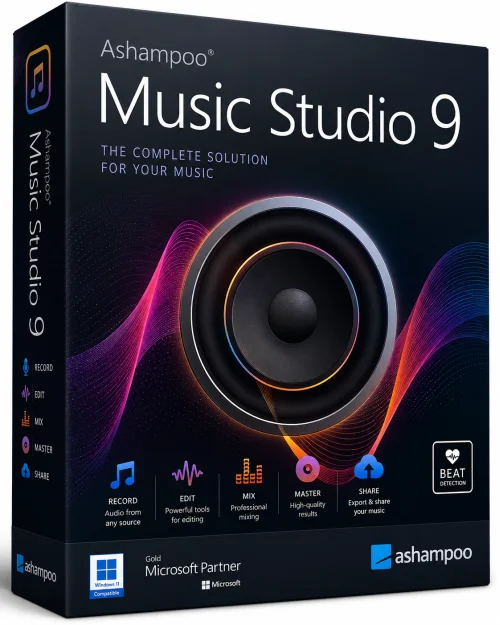
Ashampoo Music Studio is a versatile and powerful music management suite designed for Windows users who want to organize, edit, and create audio files with ease. Whether you are a casual listener looking to tidy up your music library or a budding audio enthusiast seeking to record and remix tracks, this software provides a comprehensive set of tools in a single, user-friendly package. From ripping audio CDs to converting formats, recording sound, and designing custom cover art, Ashampoo Music Studio aims to be your all-in-one companion for every musical task.
Developed by Ashampoo, a renowned name in software solutions, this application stands out for its clean interface, robust functionality, and accessible approach. It eliminates the need to juggle multiple standalone programs by offering a centralized hub for audio editing, playback, and file management. In this article, we will explore the key features, system requirements, and step-by-step instructions to help you get the most out of Ashampoo Music Studio.
Key Features
Ashampoo Music Studio comes packed with an impressive array of features that cater to both novices and experienced users. Here are the standout capabilities:
- Audio CD Ripping: Extract tracks from CDs quickly and accurately, with options to save as MP3, WMA, OGG, FLAC, and other formats, while preserving metadata and album art.
- Format Conversion: Convert audio files between popular formats (MP3, AAC, WAV, etc.) with customizable bitrate and quality settings, ensuring compatibility across all your devices.
- Audio Recording: Record from multiple sources, including microphones, streaming audio, or line-in connections, making it easy to capture podcasts, voiceovers, or streaming music.
- Audio Editing: Cut, trim, normalize, and apply effects like fade in/out, equalization, and noise reduction to polish your recordings effortlessly.
- CD Burning: Burn your favorite songs to audio CDs or MP3 CDs with simple drag-and-drop functionality, plus create custom cover art for professional-looking discs.
- Music Library Management: Organize your collection by editing tags, embedding album art, and organizing files into folders for seamless playback and retrieval.
- Playlist Creator: Generate and manage playlists for every mood or occasion, with automatic playlist suggestions based on your listening habits.
- Sound Recovery: A unique feature that attempts to restore and enhance the quality of old or damaged recordings by reducing background noise and clicks.
System Requirements
Before installing Ashampoo Music Studio, ensure your system meets the following requirements for optimal performance:
Minimum Requirements
- Operating System: Windows 7 or later (Windows 7, 8, 8.1, 10, 11)
- Processor: 1 GHz Intel/AMD CPU
- RAM: 1 GB (2 GB recommended for 64-bit systems)
- Free Hard Disk Space: 500 MB for installation
- Sound Card: Any DirectX compatible sound card
- Optical Drive: CD/DVD drive (for ripping and burning)
Recommended Requirements
- Operating System: Windows 10 or 11 (64-bit)
- Processor: 2 GHz multi-core processor or better
- RAM: 4 GB or more
- Free Hard Disk Space: 1 GB or more for extensive audio libraries
- Screen Resolution: 1280x800 or higher
- Internet Connection: Required for updates and online services
How to Install and Use
Getting started with Ashampoo Music Studio is straightforward. Follow these steps to install and utilize the software effectively.
Installation
- Visit the official Ashampoo website and download the setup file. Make sure to choose the version compatible with your Windows edition.
- Run the downloaded executable file. A security prompt may appear; click 'Yes' to allow the installer to run.
- Follow the on-screen instructions, accept the license agreement, and select the destination folder where you want to install the program.
- Choose whether to create desktop shortcuts and whether to launch the program immediately after installation. Then click 'Install' and wait for the process to complete.
- Once installed, open Ashampoo Music Studio from the desktop icon or Start menu. You may be prompted to enter a license key if you are using the full version; otherwise, you can begin with the free trial.
Basic Usage
- Ripping a CD: Insert an audio CD into your optical drive. Launch the software and select the 'Rip Audio CD' module. The tracks will appear; choose your desired output format and quality, then click 'Rip'. The audio will be saved to your computer.
- Converting Files: Click on 'Convert Audio' from the main menu. Add your files, select the target format, adjust settings like bitrate, and hit 'Convert'. The converted files will appear in the chosen output folder.
- Editing Tracks: Select 'Edit Audio' to open the waveform editor. Load a track, use the selection tools to cut segments, apply effects from the toolbar, and save the result in your preferred format.
- Burning a CD: Choose 'Burn Audio CD'. Drag and drop your songs into the order you prefer, insert a blank disc, and press 'Burn'. The software will guide you through finalizing the disc and even let you print cover art.
- Managing Your Music Library: Use the 'Manage Music' feature to rename files, update tags, and add cover art. The software can also automatically organize files into a structured folder hierarchy based on artist and album.
Pros and Cons
Like any software, Ashampoo Music Studio has its strengths and areas that could be improved. Here is a balanced look at its pros and cons:
Pros
- All-in-one solution: Combines ripping, burning, editing, converting, and organizing in a single suite, eliminating the need for multiple tools.
- User-friendly interface: The layout is clean and intuitive, making it easy for beginners to navigate without a steep learning curve.
- Fast conversion speeds: Uses optimized algorithms to handle large files quickly without compromising quality.
- High-quality output: Supports lossless formats and high bitrates, preserving audio fidelity for audiophiles.
- Cover art printing: Offers templates for creating professional-looking CD covers and inlays, a feature not commonly found in competing software.
Cons
- Windows only: There is no version for macOS or Linux, limiting its availability to a single platform.
- No cloud integration: Unlike some modern audio managers, Ashampoo Music Studio lacks built-in cloud storage synchronization, so you cannot directly access tracks from Dropbox or Google Drive.
- Occasional lag: On lower-end systems, the software may lag when editing large or high-resolution audio files.
- Trial limitations: The free version has a limited feature set, and the full version requires a purchase, which may discourage budget-conscious users.
Conclusion
Ashampoo Music Studio proves to be a reliable and comprehensive solution for audio management and production. Its blend of practical features—from CD ripping and burning to editing and organizing—makes it an excellent choice for Windows users who want to handle all their music needs without switching between different applications. While the lack of cross-platform support and cloud integration are noticeable drawbacks, its user-friendly design, consistent performance, and robust feature set make it a worthwhile investment for both hobbyists and professionals.
Whether you're digitizing your old CD collection, creating a mixtape, or cleaning up a podcast, Ashampoo Music Studio provides the tools to get the job done efficiently and with professional results. If you value simplicity and functionality in equal measure, give Ashampoo Music Studio a try—you might find it becomes your go-to music companion.