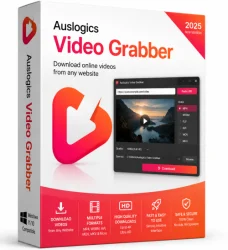
Auslogics Video Grabber for Windows 10/11
Optimize your PC with the fully compatible Windows 10 version.
Overview
Introduction and Overview
Auslogics Video Grabber is a powerful and easy-to-use desktop application designed to download videos and audio from a wide range of online platforms, including YouTube, Vimeo, Dailymotion, Facebook, and many others. With support for over a thousand websites, it allows users to save streaming content directly to their computer in various formats and resolutions, up to 4K Ultra HD. Whether you're a content creator building a media library, a student saving educational materials, or someone who wants to watch videos offline, Auslogics Video Grabber offers a reliable and efficient solution. Its intuitive interface and robust performance make it a top choice among download managers.
Key Features
- High-Quality Downloads: Supports resolutions up to 4K UHD (2160p) and audio formats like MP3, AAC, and FLAC.
- Batch Downloading: Allows you to queue multiple videos or entire playlists for simultaneous downloading.
- Built-in Browser: Integrated browser lets you search and browse video sites directly within the application.
- Format Conversion: Converts downloaded videos to popular formats such as MP4, AVI, MKV, MOV, and WMV.
- Hardware Acceleration: Uses GPU acceleration for faster processing and lower CPU usage.
- Subtitle Support: Automatically downloads subtitles in multiple languages when available.
- Extract Audio: Extracts audio tracks from videos and saves them as standalone audio files.
- User-Friendly Interface: Clean, modern design with drag-and-drop functionality and one-click downloads.
- Regular Updates: Frequent updates ensure compatibility with the latest changes on streaming sites.
System Requirements
Minimum Requirements
- Operating System: Windows 7, 8, 10, or 11 (32-bit or 64-bit)
- Processor: 1 GHz or faster
- RAM: 1 GB
- Hard Disk Space: 200 MB for installation
- Internet Connection: Required for downloading
Recommended Requirements
- Operating System: Windows 10 or 11 (64-bit)
- Processor: 2 GHz dual-core or better
- RAM: 4 GB or more
- Hard Disk Space: 500 MB or more for downloads
- Graphics Card: DirectX 10 compatible for hardware acceleration
- Internet Connection: Broadband for faster downloads
How to Install and Use
Installation
- Download the installer from the official Auslogics website or a trusted software download site.
- Run the installer and follow the on-screen instructions. You may choose between standard and custom installation.
- If prompted, deselect any optional bundled software (e.g., additional tools or browser extensions) unless desired.
- Complete the installation and launch Auslogics Video Grabber.
Using the Software
- On the main window, use the built-in browser to navigate to a video platform (e.g., YouTube) or copy and paste a video URL into the input field.
- Once the video is detected, click the download button. A dialog will appear showing available formats and qualities (e.g., MP4 1080p, MP3 320kbps).
- Select your desired format and quality, then choose a destination folder.
- Click 'Download' to start. For multiple videos, add them to the queue and click 'Download All'.
- Monitor progress in the download manager tab. Completed files can be accessed directly from the application or your chosen folder.
Pros and Cons
Pros
- Versatile: Supports thousands of websites and a wide range of formats.
- High-Quality Output: Can download videos in 4K and lossless audio.
- User-Friendly: Simple interface suitable for beginners and advanced users.
- Fast Performance: Hardware acceleration speeds up downloads and conversions.
- Batch Processing: Saves time by downloading entire playlists or channels.
Cons
- Windows Only: No native version for macOS or Linux.
- Free Version Limitations: The free version includes ads and limited conversion options; premium unlocks full features.
- Occasional Incompatibility: Some streaming sites may break after updates, though the developers fix them quickly.
- Resource Usage: Can consume significant RAM when processing multiple high-resolution downloads simultaneously.
Conclusion
Auslogics Video Grabber stands out as a robust and reliable video downloading tool for Windows users. Its support for high resolutions, batch downloading, and format conversion makes it an excellent choice for anyone looking to save online videos for offline access. While the free version has some limitations, the premium version offers exceptional value for frequent downloaders. With its regular updates and responsive customer support, Auslogics Video Grabber remains a top recommendation in its category.