ChrisPC CPU Booster for Windows 10/11
Optimize your PC with the fully compatible Windows 10 version.
Overview
Introduction and Overview of ChrisPC CPU Booster
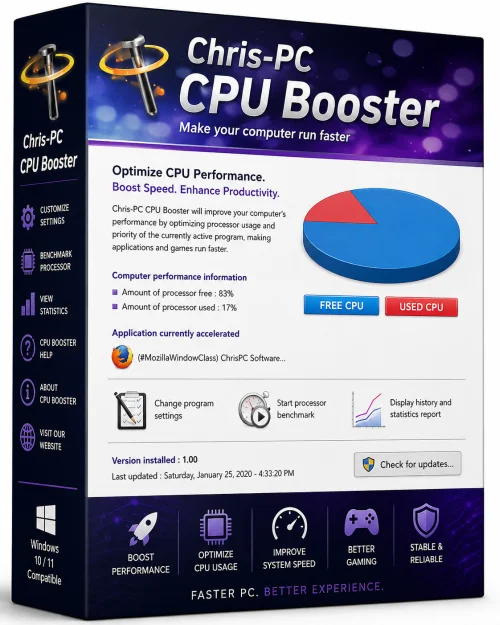
ChrisPC CPU Booster is a powerful and user-friendly system utility designed to unlock the full potential of your processor. It is developed for Windows users who want to squeeze every drop of performance from their CPU, especially when running resource-intensive applications like modern games, video editing software, or complex data analysis tools. The software works by taking control of two critical CPU parameters: process priority and core affinity. By assigning higher priority to specific applications and allowing them to use all available processor cores, it ensures that your most important tasks get maximum computational resources, resulting in smoother gameplay, faster rendering, and improved overall responsiveness.
Unlike hardware overclocking, which can be risky and requires technical expertise, ChrisPC CPU Booster operates purely at the software level. It temporarily adjusts the Windows scheduler's behavior, giving you immediate performance gains without any need to modify BIOS settings or physically alter your hardware. The tool is particularly beneficial for older systems or laptops that suffer from CPU throttling due to power-saving features, as it can disable these limitations and maintain consistent clock speeds. With its intuitive interface and one-click optimization, even novice users can enjoy a noticeable speed boost in just seconds.
In this article, we will explore the key features of ChrisPC CPU Booster, outline the system requirements, provide a step-by-step installation and usage guide, and weigh its pros and cons to help you decide if it's the right performance booster for your PC.
Key Features of ChrisPC CPU Booster
ChrisPC CPU Booster comes packed with a variety of features that cater to both casual users and advanced enthusiasts. Below are the standout capabilities that make it a must-have tool for PC optimization:
- One-Click CPU Boost: The main interface features a simple toggle button that instantly applies a pre-configured high-performance profile to all running processes, providing an immediate speed up.
- Processor Affinity Control: You can manually assign specific CPU cores to individual applications, ensuring that critical programs run on dedicated cores without competing with background tasks.
- Priority Adjustment: Set process priority to High or Realtime for chosen applications, making the operating system allocate more CPU time to them.
- Power Management Optimization: Disables CPU throttling and power-saving features like Intel SpeedStep or AMD Cool'n'Quiet, preventing frequency drops during heavy loads.
- Customizable Automation Profiles: Create and save profiles that automatically apply boost settings when particular applications launch (e.g., games or video editors).
- Real-Time Process Monitoring: Displays active processes and their current CPU usage, priority, and core assignment, giving you full transparency.
- User-Friendly Interface: A clean, tabbed layout makes navigation straightforward, and all advanced options are well-documented.
- Portable Version: A portable edition is available, allowing you to run the software directly from a USB drive without installation.
System Requirements for ChrisPC CPU Booster
Before installing ChrisPC CPU Booster, ensure that your system meets the following requirements to guarantee smooth operation and optimal performance:
Minimum Requirements
- Operating System: Windows 7, 8, or 8.1
- Processor: 1 GHz single-core CPU
- RAM: 512 MB
- Free Disk Space: 50 MB
- Internet Connection: Required for product activation and updates
Recommended Requirements
- Operating System: Windows 10 or 11 (64-bit)
- Processor: Multi-core Intel Core i5 or higher / AMD Ryzen 5 or higher
- RAM: 4 GB or more
- Storage: SSD with 100 MB free space
- Display: 1920x1080 or higher resolution for optimal UI readability
Meeting the recommended specs is not mandatory, but it ensures that the software runs smoothly alongside your other applications and that you can take full advantage of its advanced features.
How to Install and Use ChrisPC CPU Booster
Getting started with ChrisPC CPU Booster is a breeze. Follow these simple steps to install and configure the software for maximum benefit:
Installation Steps
- Download: Visit the official ChrisPC website and download the latest version of ChrisPC CPU Booster. Be sure to choose the correct edition (installer or portable) for your needs.
- Run the Installer: Double-click the downloaded file (e.g., chrpc_cpu_booster.exe). If a User Account Control prompt appears, click 'Yes' to allow the installation to proceed.
- Follow the Wizard: The setup wizard will guide you through the process. Accept the license agreement, choose the installation directory, and select any additional components (such as desktop shortcuts).
- Complete Installation: Click 'Install' and wait for the process to finish. Once done, launch the application from the Start Menu or desktop icon.
Using the Software
- Launch ChrisPC CPU Booster: When you open it for the first time, the main dashboard will display all running processes and relevant CPU statistics.
- Choose a Profile: On the 'Profile' tab, you can select from predefined profiles like 'Boost All Applications' or 'Boost Games'. For beginners, the default profile is recommended.
- Enable One-Click Boost: Click the large 'Boost' slider to instantly apply the selected profile. The software will adjust priorities and core affinities for all active processes.
- Customize Settings: If you prefer granular control, go to the 'Processes' tab. Right-click any process to set its priority (e.g., High, Realtime) and assign specific CPU cores via the 'Affinity' dialog.
- Create Automation Rules: Navigate to the 'Automation' tab to add a new rule. Enter the application name (e.g., game.exe) and define the boost settings to apply when that application starts.
- Apply and Monitor: After making adjustments, apply your changes and observe the 'CPU Usage' graph. You should see improved performance for your targeted programs.
Pros and Cons of ChrisPC CPU Booster
Like any software, ChrisPC CPU Booster has its strengths and weaknesses. Understanding these can help you make an informed decision.
Pros
- Immediate Performance Gains: Users often notice a significant improvement in frame rates and application responsiveness right after applying the boost.
- Simple and Intuitive: The one-click boost feature is accessible to everyone, while advanced options are tucked away for those who need them.
- Low System Overhead: The software itself consumes minimal CPU and RAM, so it won't slow down your system.
- Automation Capabilities: The ability to link boost profiles to specific applications makes it a hands-free solution.
- Portable Option: A portable version allows you to carry the tool on a USB drive and use it on any compatible Windows PC without installation.
- Frequent Updates: The developer regularly releases updates to ensure compatibility with the latest Windows versions and CPU architectures.
Cons
- Limited Free Version: The free trial includes basic features, but advanced automation and priority settings are locked behind a paid license. Some users may find the full price steep.
- Potential Instability: Setting process priority to 'Realtime' or forcing high priority on too many applications can cause system instability and freezes if not used carefully.
- Not a Cure-All: If your CPU is already at 100% utilization due to an outdated processor, this software won't work miracles. It mainly helps by reallocating resources, not adding raw power.
- Windows Only: There is no macOS or Linux version, limiting its audience.
- May Trigger Antivirus: Some security programs might flag the low-level system manipulation as suspicious, though it is completely safe.
Conclusion
ChrisPC CPU Booster is a versatile and effective tool for anyone looking to improve their computer's performance without spending money on hardware upgrades. Its ability to tweak processor priorities and core affinities directly addresses the most common bottlenecks in everyday computing and gaming. The software's user-friendly design makes it accessible to beginners, while the advanced customization options offer a playground for enthusiasts. Although it has minor drawbacks—such as a paid tier for full functionality and the need for cautious use to avoid system instability—the benefits far outweigh the downsides for most users.
If you're tired of laggy games, sluggish multitasking, or CPU throttling on your laptop, give ChrisPC CPU Booster a try. The trial version allows you to experience the boosted performance immediately, and the affordable full license unlocks powerful automation features that make optimization a one-time setup. With its proven track record and regular updates, it remains a reliable choice in the crowded field of PC tuning software.
Take control of your processor today and unleash the true speed of your system with ChrisPC CPU Booster.