EDrawSoft EDRaw Max for Windows 10/11
Optimize your PC with the fully compatible Windows 10 version.
Overview
Introduction and Overview
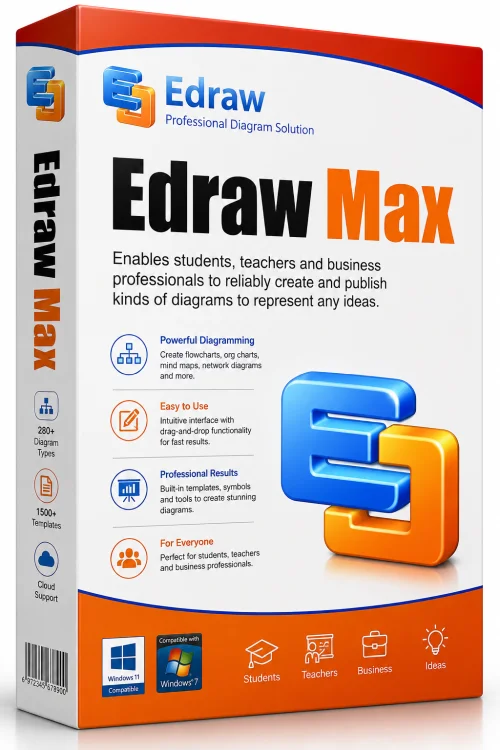
EDrawSoft Edraw Max is a powerful, all-in-one diagramming and vector graphics tool designed for professionals, educators, and business users. It simplifies the creation of flowcharts, organizational charts, mind maps, network diagrams, floor plans, engineering schematics, and more. With an intuitive drag-and-drop interface and a massive library of built-in templates and symbols, Edraw Max helps users transform complex ideas into clear visuals in minutes. Whether you are preparing a business proposal, designing a network infrastructure, or creating a study guide, Edraw Max offers the flexibility and professional output you need. This comprehensive review covers its key features, system requirements, installation steps, and pros and cons to help you decide if Edraw Max is the right diagramming solution for your needs.
Key Features
- Extensive Template Library: Edraw Max includes over 1,500 professionally designed templates and 26,000+ vector symbols spanning multiple categories, so you never start from scratch.
- Cross-Platform Compatibility: Available for Windows, macOS, Linux, and web browsers, with seamless file sharing across devices.
- Drag-and-Drop Interface: Create diagrams quickly by simply dragging symbols and shapes onto the canvas. Smart connectors automatically align and re-route for a polished look.
- Advanced Diagramming Tools: Supports flowcharts, UML diagrams, BPMN, mind maps, org charts, Gantt charts, floor plans, electrical diagrams, and many more.
- Collaboration and Sharing: Real-time collaboration lets teams work together on the same diagram. You can export to PDF, Word, Excel, PowerPoint, HTML, SVG, and image formats with one click.
- Customization and Branding: Adjust colors, shapes, fonts, and styles to match your brand. Create custom templates and stencils for repeated use.
- File Compatibility: Import and edit Microsoft Visio files (VSDX, VDX), as well as files from other popular diagram tools like Lucidchart and draw.io.
- Presentation Mode: Turn diagrams into dynamic presentations with slide-like navigation, perfect for client pitches or classroom lectures.
- Data-Linked Graphics: Import data from Excel or CSV to automatically generate charts and visualize data-driven changes.
- Offline and Cloud Access: Work offline locally while optionally syncing projects to Edraw Cloud for backup and accessibility anywhere.
System Requirements
Minimum Requirements
- Operating System: Windows 7, 8, 10, or 11; macOS 10.12 or later; Ubuntu 16.04 or later (64-bit)
- Processor: 1 GHz or equivalent
- RAM: 2 GB
- Hard Disk Space: 500 MB free space for installation
- Display: 1024 x 768 screen resolution
- Additional: Internet connection for activation and cloud features
Recommended Requirements
- Operating System: Windows 10/11 (64-bit) or macOS 11/12/13/14
- Processor: Multi-core CPU (2.0 GHz or higher)
- RAM: 8 GB or more
- Hard Disk Space: 1 GB free SSD space for better performance
- Display: 1920 x 1080 or higher with graphics acceleration
- Additional: Stable internet connection for collaboration and cloud storage
How to Install and Use
Step 1: Download Edraw Max
Visit the official EDrawSoft website or a trusted software distribution partner. Choose the correct version for your operating system (Windows, macOS, Linux, or Web). Click the download button and wait for the installer file to finish downloading.
Step 2: Install the Software
Run the installer file. Follow the on-screen instructions, accept the license agreement, and select your preferred installation directory. You can choose a custom installation to speed up startup or add desktop shortcuts. Once the installation completes, launch Edraw Max.
Step 3: Activate Your License
Edraw Max offers a free trial with limited features. To unlock full functionality, purchase a license or enter your product key. If you are using the web version, create a free account and log in to access cloud saving and collaboration tools.
Step 4: Create Your First Diagram
On the home page, browse the template gallery or choose a blank canvas. Select a diagram type such as a flowchart, mind map, or org chart. The workspace will load with relevant symbols and stencils on the left side. Drag shapes onto the canvas, connect them using smart connectors, and double-click to add text. Use the right panel to customize colors, fonts, and alignment.
Step 5: Save, Export, and Share
Save your work in Edraw Max's native format or export to popular formats like PDF, PNG, JPEG, SVG, Word, Excel, and PowerPoint. You can also share a direct link via email or embed the diagram in a website. For team projects, invite collaborators to view or edit in real time.
Pros and Cons
Pros
- Huge variety of templates and symbols for virtually every industry.
- Cross-platform support ensures you can work anywhere.
- Intuitive drag-and-drop interface reduces the learning curve.
- Strong Visio compatibility makes it a cost-effective alternative.
- One-time purchase option available, no recurring subscription required.
- Regular updates and active customer support.
- Offline desktop version works without internet.
- Export to multiple file formats keeps workflows flexible.
Cons
- Advanced features can be overwhelming for casual users.
- Free trial has limitations on saving and exporting.
- Large template library may slow down the resource browser on older PCs.
- Full version is pricey compared to some web-only tools.
- Some users report that certain complex diagrams require manual fine-tuning.
Conclusion
EDrawSoft Edraw Max is a robust and versatile solution for anyone who needs to create professional diagrams efficiently. Its extensive symbol library, cross-platform compatibility, and user-friendly design make it a top choice for businesses, educators, and freelancers alike. While the price may be a bit higher than basic online tools, the depth of features and offline capability justify the investment for heavy users. Whether you are a project manager, IT professional, or student, Edraw Max offers the freedom to visualize any concept with ease. Download Edraw Max today and elevate your documentation, presentations, and planning to the next level.