ExamDiff Pro Master Edition Full 64-bit Offline Installer
Get the standalone offline installer for 64-bit systems.
Overview
Introduction and Overview of ExamDiff Pro Master Edition Full
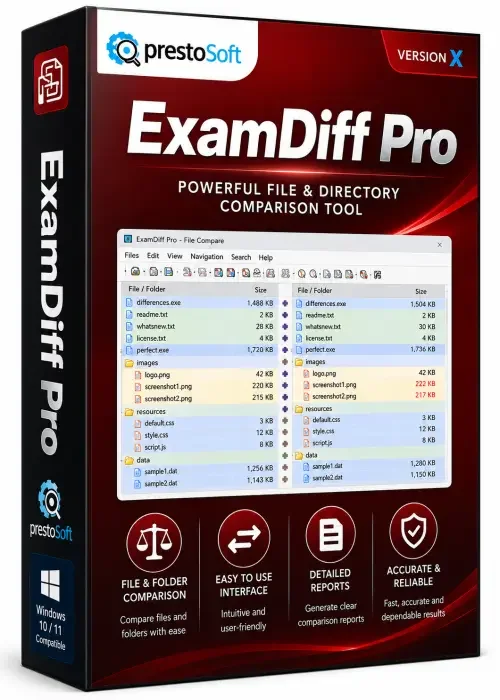
ExamDiff Pro Master Edition Full is a powerful, feature-rich file and directory comparison tool designed for developers, IT professionals, and power users who demand precision and efficiency. This advanced software goes beyond simple text comparison, offering a comprehensive suite of tools to compare files, folders, and even binary data while highlighting differences in a visually intuitive interface. Whether you are merging code, reviewing configuration changes, or synchronizing directories, ExamDiff Pro Master Edition Full provides the accuracy and speed needed to streamline your workflow. With its seamless Windows integration, customizable interface, and support for numerous file formats, this edition stands out as an indispensable utility for anyone who works with multiple versions of files.
Key Features
- Visual File Comparison: Instantly compare text, source code, binary, and Microsoft Office documents with side-by-side or inline views, with differences highlighted in color.
- Directory Comparison & Synchronization: Compare entire folders, identify missing or outdated files, and synchronize them with a single click, including support for subfolders and filters.
- Three-Way Merge: Merging changes from multiple file versions is easier with a dedicated three-way comparison mode, ideal for collaborative projects.
- Support for Many Formats: Works with plain text (ASCII and Unicode), RTF, PDF, and MS Office formats (Word, Excel, PowerPoint), as well as binary files with a hex view.
- Advanced Filtering & Ignoring: Ignore whitespace, line endings, case sensitivity, or use regular expressions to focus on meaningful differences.
- Integrated Editor: Edit files directly within the comparison screen; changes are tracked and can be saved or exported.
- Command Line Support: Automate comparisons and generate reports using a powerful command-line interface for scripting.
- Report Generation: Create detailed HTML or text reports of differences, ideal for documentation and auditing.
- File Encodings & Plugins: Supports a wide range of encodings, plus a plugin API for developers to extend functionality.
- User-Friendly Interface: Drag-and-drop functionality, customizable layout, syntax highlighting for 50+ languages, and a modern ribbon UI.
System Requirements
Minimum Requirements
- Operating System: Windows 7 or later (32-bit/64-bit)
- Processor: 1 GHz or faster
- RAM: 1 GB (2 GB recommended
- Hard Disk Space: 50 MB free space
- Display: 1024x768 resolution, 16-bit color
Recommended Requirements
- Operating System: Windows 10 or Windows 11 (64-bit)
- Processor: 2.5 GHz dual-core or better
- RAM: 4 GB or more
- Hard Disk Space: 200 MB free space for temporary files
- Display: 1920x1080 resolution, True Color
- Additional: For best performance with large files, an SSD is highly recommended.
How to Install and Use ExamDiff Pro Master Edition Full
Installation Steps
- Step 1: First, download the ExamDiff Pro Master Edition Full installer from the official website or a trusted provider. Ensure you have administrator rights on your PC.
- Step 2: Locate the downloaded setup file (usually named setup.exe or ExamDiffPro_Master.exe) and double-click to run it. If a User Account Control prompt appears, click “Yes” to allow changes.
- Step 3: Follow the on-screen instructions in the installation wizard. Choose your preferred language and accept the license agreement. You can select the installation directory or leave it as the default.
- Step 4: Optionally, you will be asked to choose additional tasks such as creating desktop icons, associating file extensions, and integrating with Windows Explorer context menu. Tick the ones you find convenient, then click “Install.”
- Step 5: Wait for the installation to complete. Once done, click “Finish.” You can launch ExamDiff Pro from the Start menu or the desktop shortcut.
Using the Software
- Compare Two Files: Open ExamDiff Pro. Click “File” > “Compare” or press Ctrl+O. Select the left and right files from your computer. The differences appear immediately in a side-by-side view.
- Compare Directories: Choose “Directory” from the toolbar. Pick two folders and set include/exclude filters. The program lists all files with status icons (same, different, missing, etc.). Use the toolbar to synchronize selected files.
- Edit and Merge: Click on any highlighted difference to jump to it. Use the arrow buttons to copy a change from one side to the other. Direct editing is also supported; simply click and type in the editor pane.
- Ignore Certain Differences: Go to “Options” > “Text Compare” or use the toolbar to toggle ignore cases, whitespace, or line endings. You can also define custom ignore rules.
- Generate a Report: After a comparison, click “File” > “Save As Report” to produce an HTML document summarizing all differences for further analysis.
Pros and Cons of ExamDiff Pro Master Edition Full
Pros
- Rich Feature Set: Offers everything from simple file comparison to advanced three-way merges, making it a comprehensive solution.
- Excellent File Format Support: The ability to compare Office documents, PDFs, and binaries is a major plus over many free alternatives.
- Speed and Stability: Even large files and directories are processed quickly, thanks to optimized algorithms and low memory consumption.
- Intuitive Interface: The ribbon-based UI and clearly color-coded difference markers make navigation easy for beginners and pros alike.
- Extensible and Scriptable: Command-line support and plugin API allow seamless integration into automated workflows.
- Regular Updates: The developer actively maintains the software, adding new features and improving compatibility with Windows updates.
Cons
- Paid License: Master Edition is not free, and the full version requires a paid license, which may be overkill for casual users.
- Learning Curve for Advanced Features: While basic comparison is straightforward, mastering all options (filters, plugins, merge modes) may take time.
- Limited Collaboration Tools: It does not offer real-time collaborative editing or cloud synchronization; you must manage files locally.
- No Built-in FTP/SFTP: It lacks direct remote file comparison, though you can work around with mounted drives.
Conclusion
ExamDiff Pro Master Edition Full stands out as a top-tier file and folder comparison tool that balances power with usability. Its extensive format support, robust merge capabilities, and automation features make it an invaluable asset for software developers, technical writers, and IT administrators. While the price tag might seem steep for infrequent users, the time savings and workflow improvements easily justify the investment for professionals who deal with file comparisons daily. If you value precision, speed, and a tool that adapts to your working style, ExamDiff Pro Master Edition Full is unquestionably worth downloading and adding to your software toolkit.