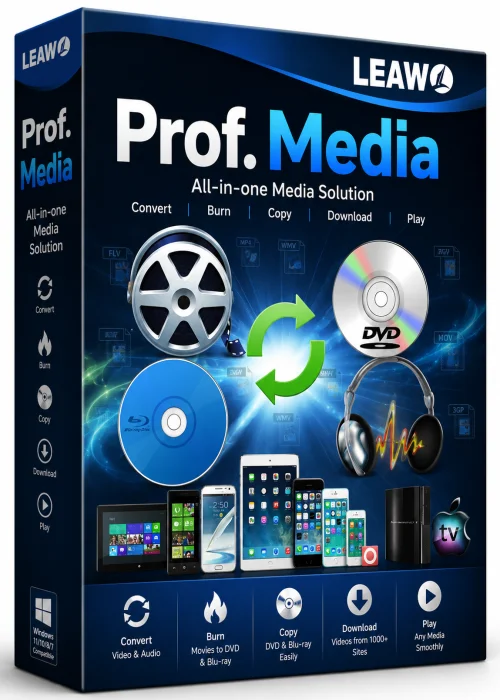
Leawo Prof. Media Full PC for Windows 10/11
Optimize your PC with the fully compatible Windows 10 version.
Overview
Leawo Prof. Media Full PC is a powerful, all-in-one multimedia software suite designed for Windows users who demand professional-grade video and audio processing capabilities. Whether you are a content creator, a social media enthusiast, or a business professional, Prof. Media combines video conversion, downloading, Blu-ray/DVD authoring, and media management into a single streamlined package. With a clean and intuitive interface, this tool eliminates the need for multiple standalone applications, offering a consolidated solution that saves time, disk space, and effort. From converting videos into over 180 formats to downloading online content from 1,000+ sites, Leawo Prof. Media positions itself as a versatile digital media hub for the modern PC.
Key Features
- Universal Video/Audio Converter: Convert between 180+ formats, including MP4, AVI, MKV, MOV, FLV, WebM, MP3, and FLAC, with support for 4K and even 8K ultra-HD video sources.
- Online Video Downloader: Download videos and music from popular platforms such as YouTube, Vimeo, Facebook, Instagram, and Dailymotion in bulk, with options to select resolution and format.
- Blu-ray & DVD Tools: Create, copy, and burn Blu-ray/DVD discs with custom menus. Convert ISO files and video folders to disc or digital formats for playback anywhere.
- Advanced Video Editor: Trim, crop, rotate, add watermarks, subtitles, and apply video effects using built-in editing functions.
- Lossless Conversion & Fast Acceleration: GPU hardware acceleration ensures high-speed conversion without sacrificing output quality.
- Media Metadata Management: Automatically fetches movie posters, genres, and detailed information for your local video library.
- Interactive Toolset: A bundled toolbox includes; video to GIF, image slideshow maker, screen recorder, and 3D conversion.
System Requirements
Minimum
- OS: Windows 7 / 8 / 10 (32-bit)
- Processor: 1 GHz Intel/AMD CPU
- RAM: 1 GB
- Hard Disk: 10 GB free space
- Graphics: DirectX 9 or higher
- Display: 1024 x 768 resolution
Recommended
- OS: Windows 10 / 11 (64-bit)
- Processor: Intel Core i5 or higher
- RAM: 8 GB or more
- Hard Disk: 30 GB SSD for optimal performance
- Graphics: NVIDIA/AMD GPU with 2 GB VRAM
- Display: 1920 x 1080 or higher with full color support
How to Install and Use
- Download: Obtain the official Leawo Prof. Media installer from a trusted source.
- Install: Run the .exe file and follow the setup wizard. Choose an installation directory and ensure you check the options for add-ons sparingly.
- Launch: Start the program. The main dashboard shows modules like Convert, Download, Blu-ray/DVD, and Toolbox.
- Convert: Click ‘Convert’ and drag and drop video files or use the ‘Add Files’ button to import content.
- Format: Select an output format from the profile bar at the bottom. Customize video and audio settings if needed.
- Edit (optional): Use the edit icon to trim, crop, or apply effects before converting.
- Convert: Press the white ‘Convert’ button. The file will be processed and saved to your chosen output folder.
- Download: For downloading online videos, copy the URL and paste it into the ‘Download’ module. Click ‘Analyze’ and then select the preferred format and resolution before hitting ‘Download’.
- Burn: For Blu-ray/DVD creation, use the dedicated module, select your source, insert a blank disc, and click the burn icon to start.
Pros and Cons
Pros
- All-in-one suite: conversion, downloading, and disc authoring.
- Excellent format support, including 8K and lossless audio.
- GPU acceleration boosts performance significantly.
- User-friendly interface suited for both beginners and advanced users.
- Regularly updated with new features and bug fixes.
Cons
- Premium price tag – not free unless using a trial.
- Trial version adds watermarks and limits full-speed conversion.
- The suite can be overwhelming if you only need basic video conversion.
- Some downloaded videos may require additional codecs for playback.
Conclusion
Leawo Prof. Media Full PC stands out as a comprehensive solution for those who frequently handle multimedia files. Its broad feature set eliminates the need for multiple software licenses, making it a wise investment for professionals and content creators despite the upfront cost. With robust 4K/8K support, an intuitive workflow, and integrated cloud features, it delivers strong performance and reliability. While not essential for casual users, anyone looking for an all-in-one media powerhouse will find Leawo Prof. Media to be a competent and feature-rich choice that meets professional demands.