NCH VideoPad Video Editor Pro for Windows 10/11
Optimize your PC with the fully compatible Windows 10 version.
Overview
Introduction and Overview
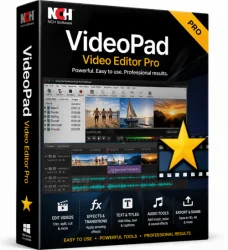
NCH VideoPad Video Editor Pro is a powerful, full-featured video editing software designed for both beginners and professionals. It offers a comprehensive suite of tools for creating, editing, and enhancing videos with ease. From simple cuts and transitions to advanced effects and multi-track timelines, VideoPad Pro supports a wide range of formats and provides intuitive controls. Whether you're crafting a home movie, a YouTube tutorial, or a professional presentation, this software delivers high-quality results without a steep learning curve. With support for 4K resolution, 3D editing, and a vast library of transitions and effects, NCH VideoPad Video Editor Pro stands out as a versatile and affordable solution for all your video editing needs.
Key Features
- Multi-Track Timeline: Work with unlimited video, audio, and image tracks for complex projects.
- Video Effects and Transitions: Hundreds of built-in effects, filters, and transitions to enhance your clips.
- 4K and 3D Support: Edit high-resolution 4K video and create stunning 3D content with anaglyph or side-by-side formats.
- Audio Editing Tools: Adjust volume, add fade effects, synchronize audio tracks, and apply noise reduction.
- Text and Titles: Customizable text overlays, animated titles, and credits with multiple fonts and styles.
- Green Screen (Chroma Key): Remove backgrounds and composite clips seamlessly.
- Screen Capture: Record your screen directly into VideoPad for tutorials or presentations.
- Export Options: Export to popular formats (MP4, AVI, MOV, etc.) and directly to YouTube, Facebook, or TikTok.
- Plug-in Support: Expand functionality with third-party plug-ins like NewBlueFX and ProDAD.
- Automatic Video Creation: Use pre-built templates or let the wizard create a video from your media files.
System Requirements
Minimum Requirements
- Operating System: Windows 7/8/10/11 or macOS 10.12+
- Processor: 1.5 GHz Intel/AMD CPU
- RAM: 512 MB
- Disk Space: 100 MB for installation
- Graphics: DirectX 9.0c compatible (Windows) or OpenGL 2.0 (macOS)
Recommended Requirements
- Operating System: Windows 10/11 (64-bit) or macOS 11+
- Processor: 2.4 GHz Intel Core i5 or equivalent
- RAM: 4 GB or more
- Disk Space: 500 MB for installation plus additional space for media
- Graphics: DirectX 10 compatible (Windows) or Metal-capable GPU (macOS)
- Display: 1280 x 768 resolution or higher
How to Install and Use
Installation Steps
- Download the installer from the official NCH website. Choose the Pro version for full features.
- Run the installer and follow the on-screen instructions. Accept the license agreement.
- Select the installation directory (default is recommended). Choose whether to create desktop shortcuts.
- Complete the installation and launch VideoPad Video Editor Pro.
Basic Usage Steps
- Start a new project: Click 'New Project' and set video resolution, frame rate, and aspect ratio.
- Import media: Use the 'Add Media' button to import video, audio, and image files from your computer or external drives.
- Arrange clips on timeline: Drag and drop media clips onto the timeline. Multiple tracks allow overlaying clips.
- Edit clips: Use the trim tool to cut unwanted sections, split clips, or adjust playback speed.
- Apply effects and transitions: Browse the effects library and drag desired effects onto clips. Transitions can be added between clips.
- Add text and titles: Click the 'Text' tab to insert titles, captions, or credits. Customize font, size, color, and animation.
- Audio adjustments: Modify volume, apply fade in/out, or add background music. Use the audio track to sync sounds.
- Preview your project: Click the 'Play' button in the preview window to see your edits in real time.
- Export video: Click 'Export Video', choose format (e.g., MP4), adjust quality settings, and select destination. You can also upload directly to YouTube or other platforms.
Pros and Cons
Pros
- User-friendly interface suitable for beginners and advanced users alike.
- Broad format support including 4K and 3D.
- Rich library of effects, transitions, and titles.
- Reasonable price with a free trial available.
- Supports plug-ins for extended functionality.
- Fast rendering and stable performance on mid-range hardware.
Cons
- Free version adds watermarks and limits some features.
- Lacks some advanced professional features like advanced color grading or motion tracking.
- Customer support can be slow at times.
- Interface may feel outdated compared to competitors.
- Fewer collaboration features for team projects.
Conclusion
NCH VideoPad Video Editor Pro is a solid choice for anyone looking for a versatile, easy-to-use video editor that doesn't break the bank. Its comprehensive feature set covers most editing needs, from basic trimming to multi-track compositing and 4K output. While it may not replace high-end professional suites like Adobe Premiere Pro or DaVinci Resolve, it offers excellent value for enthusiasts, content creators, and small businesses. The software's performance on standard hardware and straightforward workflow make it an accessible entry point into video editing. If you're seeking a reliable tool that balances simplicity with powerful capabilities, VideoPad Pro deserves serious consideration. Download the trial today and experience how effortless video editing can be.