ACRODRIFT FPV Drone Simulator Old & Previous Versions
Download legacy versions of ACRODRIFT FPV Drone Simulator.
Overview
Introduction to ACRODRIFT FPV Drone Simulator
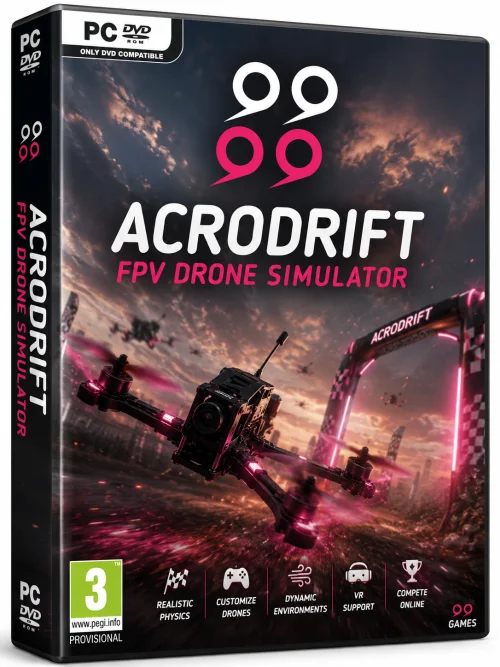
ACRODRIFT FPV Drone Simulator is a cutting-edge flight simulation software designed specifically for drone enthusiasts, FPV pilots, and professional racers. It offers an immersive, physics-accurate environment where users can practice their piloting skills without the risk of crashing a real drone. Whether you are a beginner looking to learn the basics of FPV flying or a seasoned pro honing your racing lines, ACRODRIFT delivers a realistic experience that closely mimics real-world drone behavior.
The software features stunning graphics, highly customizable drone models, and a wide range of environments, from open fields to intricate indoor courses. With its focus on performance and precision, ACRODRIFT has become a go-to tool for both hobbyists and competitive pilots. It bridges the gap between virtual practice and real-world mastery, making it an invaluable addition to any drone pilot's toolkit.
Key Features
ACRODRIFT FPV Drone Simulator is packed with features that set it apart from other simulators on the market. Here are some of the standout capabilities:
- Realistic Physics Engine: The flight dynamics are meticulously calculated, factoring in weight, thrust, drag, and environmental conditions. This ensures that the simulator feels true to life, helping pilots build muscle memory that translates directly to real drones.
- Customizable Drones: Choose from a variety of frames, motors, propellers, and flight controllers. Tune your virtual quad to match your real-world setup for a seamless practice experience.
- Multiple Environments: Fly in diverse settings including deserts, forests, urban landscapes, and indoor arenas. Each environment is designed with attention to detail, complete with weather effects like wind and rain that affect flight dynamics.
- Multiplayer Mode: Compete against friends or other pilots from around the world in real-time races and freestyle sessions, enhancing the social and competitive aspect of the hobby.
- Scenario Builder: Design your own race tracks and freestyle courses using a simple drag-and-drop interface. Share your creations with the community or download new tracks from the workshop.
- Advanced Telemetry and Replay: Monitor live data such as battery voltage, current draw, and attitude. After your flight, review replays from multiple camera angles to analyze and improve your technique.
- Cross-Platform Support: Available on Windows, macOS, and Linux, ensuring a wide range of users can enjoy the simulator regardless of their operating system.
System Requirements
To ensure a smooth and realistic FPV simulation experience, your computer must meet certain hardware specifications. The developers have optimized ACRODRIFT to run on a range of systems, but for the best experience, especially at higher graphics settings, we recommend the following:
Minimum Requirements
- OS: Windows 10 (64-bit), macOS Mojave 10.14, or Ubuntu 18.04
- Processor: Intel Core i5-4590 / AMD FX 8350 or equivalent
- Memory: 8 GB RAM
- Graphics: NVIDIA GeForce GTX 970 / AMD Radeon RX 580 (4 GB VRAM)
- DirectX: Version 11
- Storage: 10 GB available space
Recommended Requirements
- OS: Windows 11 (64-bit), macOS Monterey 12, or Ubuntu 22.04
- Processor: Intel Core i7-8700K / AMD Ryzen 7 3700X or better
- Memory: 16 GB RAM
- Graphics: NVIDIA GeForce RTX 2070 / AMD Radeon RX 5700 XT (8 GB VRAM)
- DirectX: Version 12
- Storage: 20 GB SSD for faster loading times
How to Install and Use
Getting started with ACRODRIFT FPV Drone Simulator is straightforward. Follow these steps to install and begin flying:
- Download the Installer: Visit the official website or your preferred digital distribution platform and download the appropriate installer for your operating system.
- Run the Installer: Double-click the downloaded file and follow the on-screen instructions. You can choose the installation directory and optionally create a desktop shortcut.
- Launch the Simulator: After installation, launch ACRODRIFT from your start menu or desktop icon. On first launch, you may be prompted to log in or accept the terms of service.
- Select or Configure a Drone: The simulator includes several default drones. You can also modify or create a custom drone by selecting the "Configure" option in the main menu. Adjust components to match your real-world build.
- Choose an Environment: From the "Scenarios" menu, pick a location or load a community-created map. For beginners, it's advisable to start in a wide-open area with no obstacles.
- Set Up Your Transmitter: Connect your FPV remote controller using a USB cable or wireless dongle. Navigate to the "Controller Settings" to map the sticks, switches, and protocols. Calibrate the controller to ensure accurate inputs.
- Start Flying: Once everything is configured, press the "Fly" button. Use your controller to take off, perform maneuvers, and explore. Remember to use the simulator's practice modes to fine-tune your skills.
- Review and Improve: After each session, utilize the replay feature to analyze your flight. Adjust your drone settings or try a different environment to broaden your experience.
Pros and Cons
As with any software, ACRODRIFT FPV Drone Simulator has its strengths and potential drawbacks. Here's a balanced look at what users can expect:
Pros
- Unmatched Realism: The physics engine is widely praised by professional pilots for its accuracy, making it one of the most realistic FPV simulators available.
- Regular Updates: The developers frequently release updates that add new drones, environments, and gameplay features, keeping the content fresh.
- Active Community: A vibrant multiplayer scene and a robust track workshop ensure there's always new content to explore and share.
- Cross-Platform: The ability to run on multiple operating systems makes it accessible to a broad audience.
- Educational Value: For beginners, the simulator provides a safe and cost-effective way to learn FPV flying without the risk of damaging expensive equipment.
Cons
- High System Requirements: The recommended specs are fairly demanding, which may exclude users with older or budget PCs from enjoying the best visual quality.
- Learning Curve: The full suite of customization and building tools can be overwhelming for newcomers who just want to fly.
- VR Support Limited: While the simulator supports head tracking, native VR headset integration is not as polished as some competitors.
- Price: Compared to free alternatives, ACRODRIFT's price point may be a barrier for some users, though the features justify the cost for serious pilots.
Conclusion
ACRODRIFT FPV Drone Simulator stands out as a premium choice for FPV enthusiasts who demand accuracy, realism, and a thriving community. Its robust physics engine and extensive customization options make it an essential tool for anyone looking to improve their piloting skills, whether for recreation or professional racing. While the hardware requirements are steep and there's a bit of a learning curve, the payoff is an immersive experience that closely mirrors real-world flight dynamics.
If you're ready to take your FPV drone flying to the next level, ACRODRIFT offers a safe, dynamic, and endlessly engaging platform. Download it today and start soaring through virtual skies that will transform your real-world flying. With its ongoing updates and dedicated community, ACRODRIFT is more than just a simulator—it's a training ground for the future of drone flight.