Avada | Website Builder For WP & WooCommerce By ThemeFusion Old & Previous Versions
Download legacy versions of Avada | Website Builder For WP & WooCommerce By ThemeFusion.
Overview
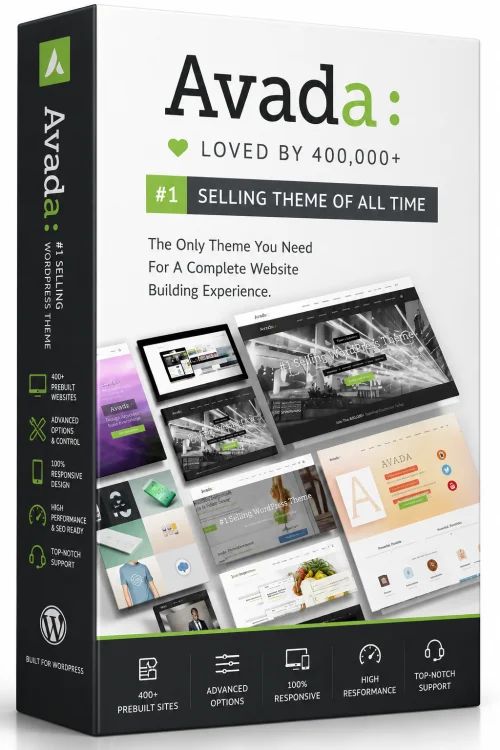
Avada | Website Builder For WP & WooCommerce By ThemeFusion is more than just a WordPress theme; it is a comprehensive website building solution that powers over 900,000 websites worldwide. Renowned for its flexibility, performance, and user-friendly drag-and-drop builder, Avada allows both beginners and professionals to craft stunning, high-converting websites without writing a single line of code. Whether you are creating an eCommerce store, a business site, a portfolio, or a blog, Avada’s all-in-one design platform provides the tools and pre-built demos to get your project up and running quickly. This article explores the key aspects of Avada, including its features, requirements, installation process, and advantages and disadvantages, to help you decide if it’s the right choice for your next web project.
Introduction and Overview
Avada is the best-selling WordPress theme of all time, developed by ThemeFusion. It has earned its reputation as the most reliable and feature-rich multipurpose theme on the market. But Avada is more than just a theme; it includes the Avada Builder, a powerful front-end and back-end drag-and-drop page builder, and the Avada Core and Avada Fusion options, which give you total control over every aspect of your site’s appearance and functionality. With Avada, you can create almost any type of website, from simple landing pages to complex corporate portals, thanks to its 100+ pre-designed website templates (demos) that can be imported with a single click.
One of the most significant advantages of Avada is its seamless integration with WooCommerce, the leading eCommerce plugin for WordPress. This means that building an online store with Avada is both intuitive and visually appealing. The theme is optimized for speed and SEO, ensuring that your site not only looks great but also ranks well in search engines. Avada is continuously updated, and its support forum provides extensive documentation and tutorials to help you along the way.
In this comprehensive guide, we will dive deep into Avada’s key features, system requirements, installation steps, and the pros and cons of using this premium theme for your website.
Key Features
Avada is packed with features that make it a powerhouse for website creation. Here are some of the most notable ones:
- Avada Builder: A robust drag-and-drop front-end and back-end builder with 65+ design elements, allowing you to create custom layouts, headers, footers, and content without coding.
- 100+ Pre-Built Demos: A growing library of professional website templates across various niches (business, eCommerce, creative, health, education, etc.) that can be imported in one click.
- WooCommerce Integration: Fully compatible with WooCommerce, offering a seamless shopping experience with custom product pages, cart, and checkout options.
- Advanced Theme Options: A centralized panel with 700+ options to control global settings, including typography, colors, layouts, backgrounds, and more.
- Header and Footer Builder: Create unique headers and footers using live drag-and-drop builder, with sticky header and mega menu support.
- Performance Optimized: Built with Google PageSpeed for fast loading times, including optimized CSS/JS delivery, lazy loading, and GDPR-compliant features.
- SEO Ready: Clean coding and integration with popular SEO plugins like Yoast and RankMath to help improve your search engine rankings.
- Translation & RTL Ready: Fully translated into many languages, compatible with WPML and RTL languages for multilingual sites.
- Extensive But Flexible: Works with any WordPress theme? No – Avada is a complete ecosystem. It supports popular plugins like Elementor (via Converter), but the built-in builder is the core focus.
- Regular Updates: Free lifetime updates with a single purchase, ensuring your theme stays up-to-date with the latest WordPress changes and compatibility.
System Requirements
Avada is built to run on modern web hosting environments, but to ensure optimal performance, your server should meet or exceed the following requirements:
Minimum Requirements
- WordPress Version: 5.0 or newer
- PHP Version: 7.4 or higher
- MySQL Version: 5.6 or higher
- Memory Limit: 128 MB (WP Memory Limit)
- Web Server: Apache or Nginx
Recommended Requirements
- WordPress Version: 6.0 or newer
- PHP Version: 8.0 or higher (for best performance and security)
- MySQL Version: 8.0 or MariaDB 10.x
- Memory Limit: 256 MB or higher
- Web Server: Nginx with LiteSpeed or similar for fast page delivery
- HTTPS: Active SSL certificate for secure browsing and SEO
It’s also crucial to have a reliable hosting provider that supports PHP, MySQL, and grants you access to install themes and plugins. If you plan to run a large eCommerce store, consider virtual private server (VPS) hosting or dedicated hosting with sufficient resources.
How to Install and Use
Installing Avada is straightforward. Follow these steps to set up your website with the Avada theme:
Step 1: Install the Avada Theme
- Purchase and download Avada from ThemeForest or ThemeFusion's website. You will receive a zip file named avada.zip.
- Log into your WordPress admin dashboard (wp-admin).
- Navigate to Appearance > Themes and click the Add New button.
- Click Upload Theme, choose the avada.zip file, and click Install Now.
- Once installed, click Activate to activate the theme.
Step 2: Install Required Plugins
- After activation, you will see a notice prompting you to install the necessary plugins (e.g., Avada Core, Avada Builder, Revolution Slider, etc.).
- Go to Appearance > Install Plugins. Select all required and recommended plugins and click Install.
- After installation, click Activate for each plugin. You may also need to install the 'Fusion Builder' plugin separately if it's not included.
Step 3: Import a Demo (Optional but Recommended)
- Go to Avada > Fusion Builder or Avada > Demos (depending on your version).
- Choose a demo website that matches your niche from the list (e.g., Business, Corporate, Restaurant, etc.).
- Click Install next to the demo. Wait for the import process to finish.
- Once imported, you can start customizing the site using the Avada Builder, theme options, and live customizer.
Step 4: Customize Your Website
- Use Avada > Theme Options to set global styles such as colors, fonts, layout, and headers.
- Use the Avada Builder to edit individual pages – simply edit a page and click 'Use Avada Builder' to start drag-and-drop editing.
- Add, edit, or delete sections, columns, and elements (buttons, sliders, forms, etc.) effortlessly.
- Set up menus, widgets, and other WordPress features normally under Appearance.
- For WooCommerce, install the WooCommerce plugin separately and configure it – Avada will automatically style the shop pages.
Step 5: Save and Publish
- After customizing your pages, click the Publish button to make changes live.
- Test your site on different devices to ensure everything looks responsive and works correctly.
Remember to regularly update Avada to the latest version and keep your plugins updated for security and performance.
Pros and Cons
Like any website builder, Avada has its strengths and weaknesses. Here is an honest look at its pros and cons:
Pros
- Highly Flexible: Avada is exceptionally versatile. You can create virtually any layout or design thanks to the page builder and thousands of options.
- All-in-One Solution: No need to purchase additional page builders or plugins for common features – most are included.
- Pre-Built Demos: The demo content offers excellent starting points and saves time, especially for non-technical users.
- Strong WooCommerce Support: Their eCommerce integration is seamless and provides beautiful storefronts without extra styling.
- Reliable Performance: Despite its feature-rich nature, Avada is optimized for speed and can be further tuned with built-in options.
- Excellent Support and Documentation: ThemeFusion provides extensive knowledgebase, video tutorials, and fast, thorough support from their team.
- One-Time Payment: Pay once, use forever, with free lifetime updates and support for six months (extendable).
Cons
- Learning Curve: The sheer number of options and builder features can be overwhelming for beginners initially.
- Complexity: Some users report that customizing specific elements may require extensive tweaking, and the interface could be simpler.
- No Individual Page Builder License: Avada’s builder is tied to the theme; if you switch themes, you lose the builder functionality.
- Potential Overkill: For simple websites, Avada might be more than what you need, and its bundle could lead to bloat if not optimized well.
- Support Renewal Cost: After six months, support renewal is an additional cost (optional, but many prefer continuous support).
Conclusion
Avada by ThemeFusion stands as a testament to quality and innovation in the WordPress ecosystem. Its unmatched popularity is supported by a rock-solid feature set, regular updates, and a massive community of users. For anyone looking to build a professional, visually stunning, and functional website—especially an eCommerce store via WooCommerce—Avada provides a powerful, all-in-one platform that can bring your vision to life.
While it may not be the simplest theme for absolute beginners, the availability of demos, extensive documentation, and dedicated support makes the learning process manageable. The upfront cost is justifiable given the lifetime updates and the huge amount of value packed into this theme. If you prioritize flexibility, scalability, and long-term performance, Avada is undoubtedly a top-tier choice. We highly recommend giving it a try for your next WordPress project.