Cascadeur Full Old & Previous Versions
Download legacy versions of Cascadeur Full.
Overview
Introduction and Overview
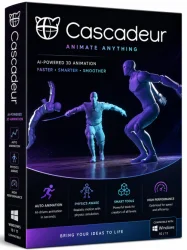
Cascadeur Full is a cutting-edge 3D animation software designed specifically for creating physics-based character animations. Developed by Nekki, this tool empowers animators to produce realistic, dynamic movements with minimal effort. Unlike traditional keyframe animation, Cascadeur leverages physics simulation and AI-assisted tools to automate the tedious aspects of animation, such as secondary motion, weight, and balance. The software is ideal for game developers, filmmakers, and VFX artists who need high-quality character animations without spending hours on manual adjustments. Cascadeur Full provides all features without limitations, including advanced rigging, ragdoll simulation, and export to major game engines like Unity and Unreal Engine. Whether you are a professional or a hobbyist, Cascadeur Full streamlines the animation pipeline, allowing you to focus on creativity.
Key Features
- Physics-Based Animation: Automatically generate realistic secondary motions, such as cloth, hair, and jiggling, using built-in physics solvers.
- AI-Assisted Keyframing: Tools like Auto-Posing and Auto-Physics help create natural poses and smooth transitions with minimal input.
- Ragdoll Simulation: Easily create ragdoll effects for falls, impacts, and death animations, with full control over joint constraints.
- Modular Rigging: Pre-built humanoid rigs with intelligent muscle systems that react to movement, plus support for custom rigs.
- Real-Time Preview: Instant feedback with real-time rendering and physics simulation, so you see the final result as you work.
- Export Compatibility: Export animations in FBX, Collada, and other formats, with direct integration for Unity, Unreal Engine, and Blender.
- Layer-Based Animation: Organize movements into layers for non-destructive editing, similar to Photoshop for animation.
- Motion Library: Access a growing library of pre-made animations and presets to jumpstart your projects.
- Time Editor: Advanced timeline for adjusting speed, timing, and blending animations with ease.
- Inverse Kinematics (IK): Full IK support for precise control over limb placement, especially useful for foot and hand positioning.
System Requirements
Minimum Requirements
- OS: Windows 7/8/10 (64-bit) or macOS 10.12+
- Processor: Intel Core i5-2400 / AMD FX-6100
- RAM: 8 GB
- Graphics: NVIDIA GeForce GTX 660 / AMD Radeon HD 7870 with 2 GB VRAM
- DirectX: Version 10
- Storage: 2 GB available space
Recommended Requirements
- OS: Windows 10/11 (64-bit) or macOS 11+
- Processor: Intel Core i7-7700 / AMD Ryzen 5 1600
- RAM: 16 GB
- Graphics: NVIDIA GeForce RTX 2060 / AMD Radeon RX 5600 with 6 GB VRAM
- DirectX: Version 12
- Storage: SSD with 4 GB available space
How to Install and Use
Installation
- Download the Cascadeur Full installer from the official website or your trusted software repository.
- Run the installer executable (.exe on Windows, .dmg on macOS).
- Follow the on-screen prompts: accept the license agreement, choose installation directory, and select components (ensure Full version is selected).
- Wait for installation to complete; the process typically takes 5-10 minutes.
- Launch Cascadeur from your desktop shortcut or start menu.
- Activate the Full version using the provided license key (if required) or create an account to unlock full features.
Basic Usage
- Upon launching, create a new project or open a template.
- Import a character model (FBX, OBJ, or use the provided sample rig).
- In the 3D viewport, select the character's bones or control rig.
- Use the Auto-Pose tool to set initial keyframes – the AI will suggest natural poses based on context.
- Enable physics simulation for secondary motion by toggling the physics layer.
- Adjust keyframes on the timeline, tweak physics parameters (stiffness, damping, gravity), and refine animations.
- Use the ragdoll tool for impacts: select the character, click 'Ragdoll', and simulate falling or collision.
- Export your animation: go to File > Export, choose FBX or other format, and set options like skinning or animation clips.
Pros and Cons
Pros
- Time-Saving: Physics and AI automation reduce manual work dramatically.
- Realistic Movements: Natural weight and balance without complex rigging.
- User-Friendly: Intuitive interface suitable for beginners and pros.
- Integration: Seamless export to major game engines and DCC tools.
- Active Development: Regular updates and community support.
- Cost-Effective: Competitive pricing compared to high-end animation suites.
Cons
- Steep Learning Curve: Though intuitive, mastering physics parameters takes practice.
- Limited Character Types: Optimized for humanoid characters; non-humanoid animation may be less efficient.
- System Demands: Requires a powerful GPU for real-time physics.
- No Built-In Modeling: Relies on external software for character creation.
- Library Restrictions: Free motion library is modest; premium content costs extra.
Conclusion
Cascadeur Full stands out as a revolutionary tool for character animation, merging physics simulation with AI assistance to deliver professional-grade results in a fraction of the time. It is particularly valuable for game developers and indie studios needing consistent, high-quality animations without the overhead of traditional keyframing. While it has a few limitations, such as dependence on external models and a learning curve for physics tuning, the benefits far outweigh the drawbacks. For anyone serious about 3D character animation, Cascadeur Full is a worthy investment that will enhance your workflow and output. Download the full version today and experience the future of animation.