Best Alternatives to Chris-PC RAM Booster
Explore top software like Chris-PC RAM Booster in 2026.
Overview
Introduction and Overview
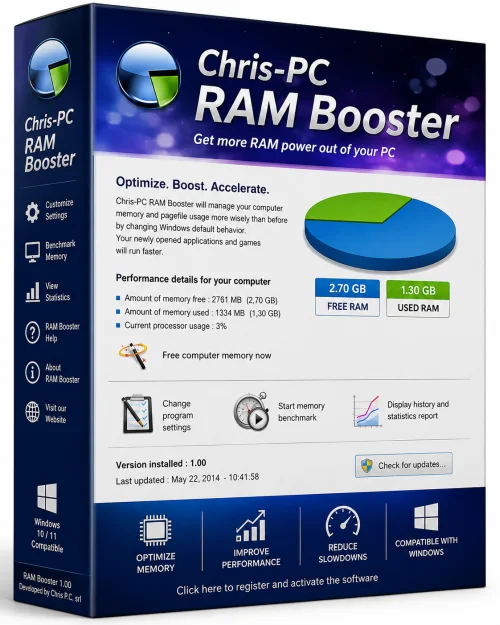
Chris-PC RAM Booster is a powerful yet lightweight system utility designed to optimize your computer's memory usage. Developed by Chris-PC, a trusted name in system enhancement tools, this software focuses on freeing up RAM, improving system responsiveness, and boosting overall performance. Whether you are a gamer, a professional running memory-hungry applications, or simply a user tired of sluggish systems, Chris-PC RAM Booster offers a straightforward solution to keep your PC running at peak efficiency.
By intelligently managing physical memory, the tool reduces the risk of system crashes, application freezes, and slowdowns caused by memory overload. It works by scanning your system in real-time, identifying memory-hogs, and safely releasing unused RAM for more critical tasks. Unlike some aggressive optimizers that can cause instability, Chris-PC RAM Booster uses balanced algorithms to ensure system stability while maximizing available memory.
Key Features
Chris-PC RAM Booster comes packed with features designed to give you complete control over your system's memory. Here are the standout capabilities:
- Automatic RAM Cleaning: The software automatically monitors and cleans RAM at predefined intervals, ensuring your system never runs out of memory without requiring manual intervention.
- One-Click Booster: A dedicated booster button instantly cleans up memory and closes idle background processes, giving you an immediate speed boost.
- Process Manager: View all running processes and their memory consumption in real-time. You can end unwanted tasks directly from the interface to free up resources.
- Detailed Memory Stats: Get a comprehensive overview of your system's memory usage, including physical, virtual, and available RAM, displayed in easily readable charts and graphs.
- Customizable Cleaning Options: Adjust the sensitivity of the cleaning process, set specific thresholds, and choose which applications to exclude from being cleaned.
- System Information: Access essential details about your hardware, such as CPU, motherboard, and total RAM, all within the same tool.
- Multi-Core Optimization: Helps distribute process loads across CPU cores, further enhancing overall system performance.
- Portable Version Available: Run the program without installation, making it easy to carry on a USB drive and use on any PC.
System Requirements
Chris-PC RAM Booster is a lightweight application, but it still has specific hardware and software prerequisites to run smoothly.
Minimum Requirements
- Operating System: Windows XP, Vista, or 7
- Processor: 1 GHz or faster
- RAM: 512 MB
- Hard Disk Space: 20 MB of free space
- Display: 800x600 resolution
Recommended Requirements
- Operating System: Windows 7, 8, 10, or 11 (both 32-bit and 64-bit)
- Processor: 2 GHz dual-core or better
- RAM: 1 GB or more (4 GB for heavy multitasking)
- Hard Disk Space: 50 MB of free space
- Display: 1024x768 resolution or higher
The software is compatible with all Windows versions from XP onwards, making it a versatile choice for older and newer machines alike.
How to Install and Use
Getting started with Chris-PC RAM Booster is a breeze. Follow these simple steps to install and begin optimizing your system.
Installation Steps
- Download the installer from the official Chris-PC website or a trusted third-party software repository. Ensure you choose the correct version (standard or portable).
- Double-click the downloaded setup file (e.g., ram_booster_setup.exe). If a User Account Control prompt appears, click “Yes” to allow changes.
- Follow the installation wizard. You can choose a destination folder or keep the default. Click “Next” and then “Install”.
- Wait for the installation to complete. Once done, click “Finish” to launch the software for the first time.
Using the Software
- When the program starts, you'll see the main dashboard displaying your current RAM usage, available memory, and a real-time graph.
- To free up memory instantly, click the “Booster” button. The software will scan and clean a significant portion of your RAM in a few seconds.
- For automatic cleaning, go to the “Settings” or “Options” tab. Enable the “Auto Clean” feature and set an interval (e.g., every 30 minutes) at which the tool should run.
- Navigate to the “Process Manager” tab to see all running tasks. Right-click any process and select “End Process” to close it, or use the “Clean” button to terminate multiple low-priority background tasks.
- You can also customize which processes are ignored by adding them to an exclusion list. This prevents the tool from cleaning applications you need to keep running.
- If you prefer hands-on control, use the “Custom Clean” option to select specific memory areas to free up based on your current activity.
Once configured, Chris-PC RAM Booster runs quietly in the system tray, providing notifications about successful cleans and keeping your RAM levels optimal without any user input.
Pros and Cons
Like any software, Chris-PC RAM Booster has its strengths and limitations. Here’s a balanced look.
Pros
- User-Friendly Interface: The clean dashboard is easy to navigate, making it accessible for both novices and power users.
- Immediate Performance Boost: The one-click booster provides noticeable speed improvements, especially when memory is critically low.
- Lightweight and Fast: The application uses minimal CPU and RAM itself, ensuring it doesn't add to the very problem it solves.
- Customizable Automation: Users can set automatic cleaning schedules and define exclusions, offering a tailored experience.
- Wide Compatibility: Works across many Windows versions, including older systems like XP and Vista.
- Portable Version: Ideal for technicians and users who need to optimize multiple PCs without installing software.
Cons
- Basic Memory Management: Unlike some modern operating systems, Windows already handles memory management quite well. The real-world benefits may be less dramatic on systems with abundant RAM.
- No 64-Bit Specific Optimization: While compatible with 64-bit systems, the tool does not offer advanced features like memory compression or deep cache optimization found in premium tools.
- Limited Support for Newer Features: The software hasn't been updated frequently in recent years, which may lead to compatibility concerns with future Windows updates.
- Potential Data Loss: Ending important background processes may cause unsaved work in some applications if used carelessly.
- No Trial Version: The full version is paid after a short evaluation period, unlike some free alternatives.
Conclusion
Chris-PC RAM Booster is a competent and reliable memory optimization tool that serves its purpose well, especially for older computers or systems with limited RAM. It combines ease of use with a broad feature set, from one-click cleaning to detailed process management. Best of all, it is lightweight and runs without interfering with your daily tasks.
If your PC frequently slows down due to memory exhaustion, and you prefer a hands-on or automated approach to keep it responsive, Chris-PC RAM Booster is definitely worth downloading. While modern operating systems are more efficient, the tool still provides tangible benefits for users who run heavy applications, multitask intensely, or use aging hardware. Give it a try, and you'll notice a difference in your system's speed and stability.